How to Automate Your PostHog Weekly Review with AI
Build an AI agent that pulls your PostHog AARRR metrics, spots what changed, and posts an actionable digest to Slack daily

You set up PostHog analytics. You instrumented 50 events. You built the AARRR pirate metrics dashboard with funnels, retention charts, and trend lines. It looked great on demo day.
That was three months ago. Nobody has opened it since.
This is the most common failure mode in product analytics nobody uses: not the tooling, not the data, the habit. 73% of collected data goes completely unused (Forrester). 60% of dashboards haven't been touched in 90 days. You have a dashboard nobody looks at because nobody has time to go interpret it and figure out what to do about it.
PostHog has a subscriptions feature that sends chart screenshots to Slack on a schedule. But a static image of a retention curve with no context isn't a PostHog Slack weekly report. It's wallpaper. What if you could automate PostHog reports with an AI agent connected via PostHog MCP that reads your data, compares this week to last week, and tells you in plain language what changed and why?
That's what we're building: a PostHog AI agent that turns raw metrics into a PostHog weekly digest your team actually reads.
Skip the explanation. Build this agent now. Go to copilot →
Pull vs. push: why dashboards fail
A dashboard requires you to go look at it, remember what last week's numbers were, mentally compare, and draw conclusions. A digest comes to you, pre-analyzed, with the delta and the context already computed.
Elena Verna wrote that weekly metrics reviews "commonly get cancelled, demoted to an email update, or become spawning grounds for long lists of follow-up questions just so the group feels they did something." The meeting isn't the problem. The preparation is. The only way to automate weekly metrics review so it actually sticks is to remove the human from the preparation loop entirely.
An AI analytics agent eliminates the preparation. It queries PostHog, runs the comparison, writes the narrative, and delivers an AI product metrics report. Your job is to read it and decide what to act on.
The approach: automate product analytics with AI where it matters
Same principle as our Sentry triage agent: don't use AI where you don't need it.
- Schedule trigger: Monday at 8am. Just a cron.
- PostHog MCP agent: query your AARRR metrics, compare week-over-week, flag anomalies, write a summary. This is the step that lets you automate AARRR metrics analysis instead of doing it by hand.
- Slack action: automate PostHog to Slack delivery. Same channel every time.
One prompt to build it
Open the copilot and describe what you want:
"Every Monday at 8am, pull my PostHog AARRR metrics for the last 7 days. Compare to the previous 7 days. For each stage (acquisition, activation, retention, revenue, referral), show the key metric, the week-over-week change, and flag anything that moved more than 15%. Write a summary with what's improving, what's declining, and one recommended action. Post it to #product in Slack."
Paste this prompt into the copilot and deploy in under 5 minutes. Try it now →
The copilot figures out the building blocks: a schedule trigger, an AI agent node with PostHog MCP connected, and a Slack action at the end. It configures the agent prompt, connects your PostHog project, and lays it out on the canvas. You review each node, test it, deploy.
What the agent actually queries
With the PostHog Slack integration handled by MCP, the agent can run real queries against your data. Here's what a typical pirate metrics review covers, with aarrr metrics examples for each stage:
- Acquisition: unique visitors, signup conversion rate, top referring domains. "Did more people find us this week?"
- Activation: signup-to-first-value funnel, onboarding completion rate, time to first key action. "How many actually got value?"
- Retention: DAU/WAU ratio, D7 and D30 cohort retention, returning vs. new users. "Are people coming back?"
- Revenue: trial-to-paid conversion, MRR trend, expansion revenue. "More or less than last week?"
- Referral: organic signups by source, invite funnel. "Are users bringing other users?"
Because the PostHog MCP server exposes real query tools, the agent doesn't just pull numbers. It compares them. "Activation dropped from 34% to 28% this week. The biggest drop-off is between 'workflow created' and 'first execution', step 3 in your onboarding funnel." That's the difference between a dashboard screenshot and an actual product review.
What you get
Every Monday morning, before your standup, your #product channel gets this:
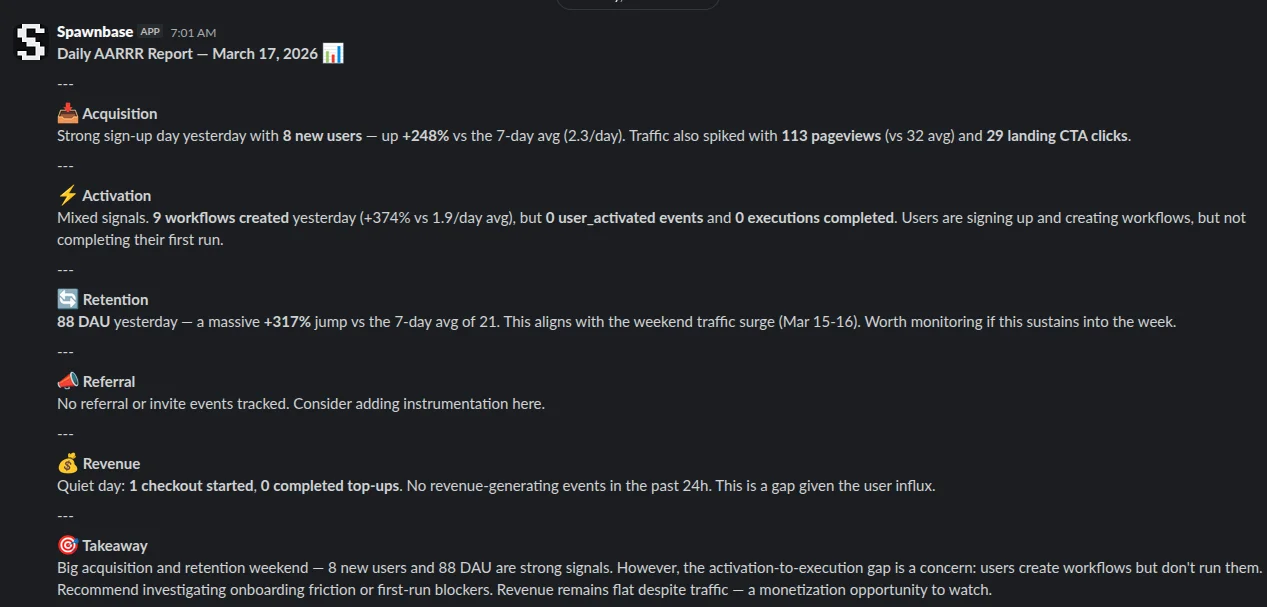
No more "did anyone check the dashboard this week?" The agent checked it. You decide what to fix.
What it costs
Tracking weekly metrics with a PostHog AI agent that queries 5-10 insights, processes roughly 15K input tokens (metric data + historical context) and 3K output tokens (the written digest).
| Option | Per run | Monthly (4 runs) | |
|---|---|---|---|
| Haiku / Flash | $0.03 | $0.12 | Good enough for weekly digests |
| Sonnet 4.6 | $0.15 | $0.60 | Better narrative quality |
| Opus 4.6 | $0.75 | $3.00 | Overkill, but thorough |
| PM doing it manually | — | 2-4 hours/week | If it happens at all |
| Dedicated analytics tool | — | $99-499/mo | Improvado, Funnel.io, etc. |
PostHog MCP calls are plain API requests, zero cost on the AI side. Product metrics automation doesn't have to be expensive. You're paying for the model to think about your data, not to fetch it.
$0.60/month with Sonnet. Replaces the 2-hour weekly prep that never happens anyway. Build this agent →
Going further
Once the weekly digest is working, you can extend the agent:
- Daily anomaly alerts: run a lighter version daily that only posts when a metric moves more than 20%. No noise on normal days.
- Cross-reference with Sentry: connect both PostHog MCP and Sentry MCP servers to the same agent. When activation drops, the agent checks if new errors correlate with the drop-off step.
- Linear ticket creation: when the agent flags a significant regression, have it create a Linear ticket with the analysis already written.
- Custom AARRR definitions: every product defines "activation" differently. Teach the agent your specific definition, and it tracks that, not a generic proxy.
The whole point of PostHog automation Slack delivery is that each piece is composable. You can automate PostHog Slack notifications at whatever granularity makes sense for your team. Start with the weekly digest, expand when you see what's useful.
Build this agent in 5 minutes
Connect your PostHog, tell the copilot what to analyze. Free credits on signup.
Start building →