How to Automate Your Daily Standup Report with AI
Build an AI standup bot that summarizes Linear tickets, flags blockers, and posts a daily standup report to Slack with no code

Standups are useful when they create awareness across the team, surface blockers, and make it clear what needs attention today.
The problem is not status itself. The problem is when status turns into repetition. If the board already says you are still on the auth migration, the team probably does not need a full replay of the ticket.
What people do need is the context around it: what changed, what is stuck, what now needs help, and whether anything should move up the priority list.
Skip the explanation. Build a standup agent now. Go to copilot →
The problem with most standups
Standups drag because they are full of information that could have been read before the call. "Yesterday I worked on the auth migration, today I'm still working on it" is not a discussion. It is a ticket update.
Meanwhile, the things worth discussing are easy to miss: a ticket that has been stuck for a week, a question nobody answered, a dependency that needs someone else to move.
Some teams replace the meeting with a Slack bot that asks, "what did you do yesterday?" That helps a little, but it still leaves the annoying part to a human. Someone has to scan Linear or Jira, notice what is stale, notice what has no priority, and turn a messy board into something the team can act on.
Without the right context surfaced ahead of time, the meeting either runs long or misses what matters. Usually both.
Keep your board honest
No automation fixes a board that nobody updates. If the data is stale, the report will be stale too. That is not a bug. It is the point.
If a daily report keeps calling out "SPA-69 has had no updates in 48 days," people notice. More importantly, the team notices. That creates a useful kind of pressure without needing a manager to chase everyone down.
Keeping the board honest is half the job. The other half is turning that raw board into a quick read before the meeting starts.
Put the context in Slack before the meeting starts
Instead of sending a reminder to post updates, have the workflow do the synthesis for you. It reads the board, looks at what is in progress, checks what has gone stale, and posts a standup summary to Slack before anyone joins the call.
Every weekday at 9am, a Slack message lands in your dev channel:
- In-progress tasks grouped by owner
- Today's priorities ranked by urgency and staleness
- Potential blockers flagged automatically: stale tickets, missing priorities, tasks without descriptions
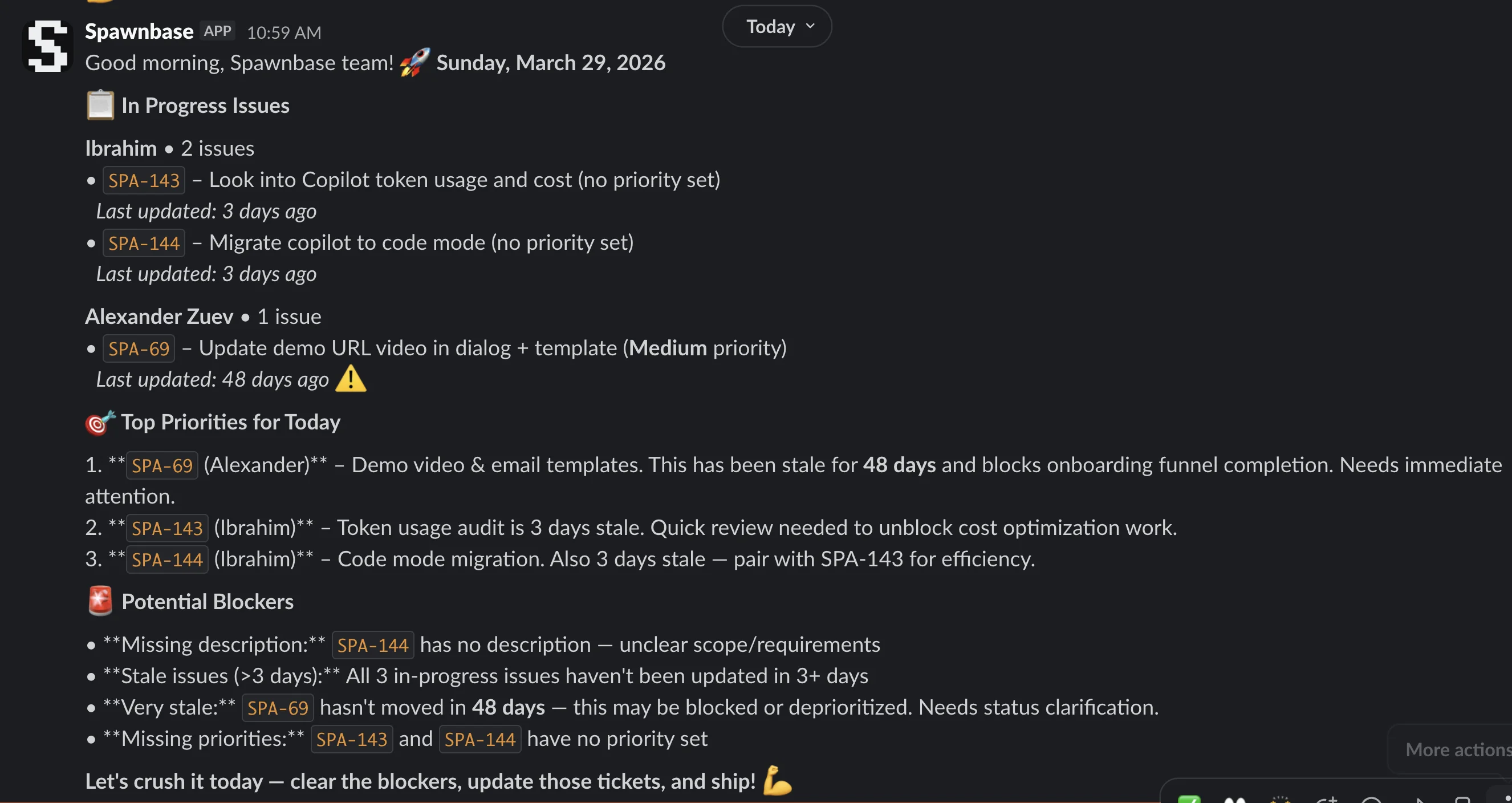
Some people will read it before the standup. More realistically, the team will glance over it at the start and use it to get oriented quickly. Then the meeting can move to the useful part: "I am blocked on X," "Can someone review Y," "Do we still want Z this sprint?"
That is a better use of fifteen minutes than hearing five people restate the board.
One prompt to build a no-code standup workflow
Here is the prompt I used to build the whole thing. No code required:
Look at my in-progress tasks for the current cycle on Linear in the Spawnbase team and create a report on Slack for in progress tasks. Communicate priorities for the day and any potential blockers. Schedule for every weekday at 9am in the #dev channel.
The copilot reads that, figures out which integrations you need, sets up the AI agent with the right analysis step, and lays out the workflow on the canvas.
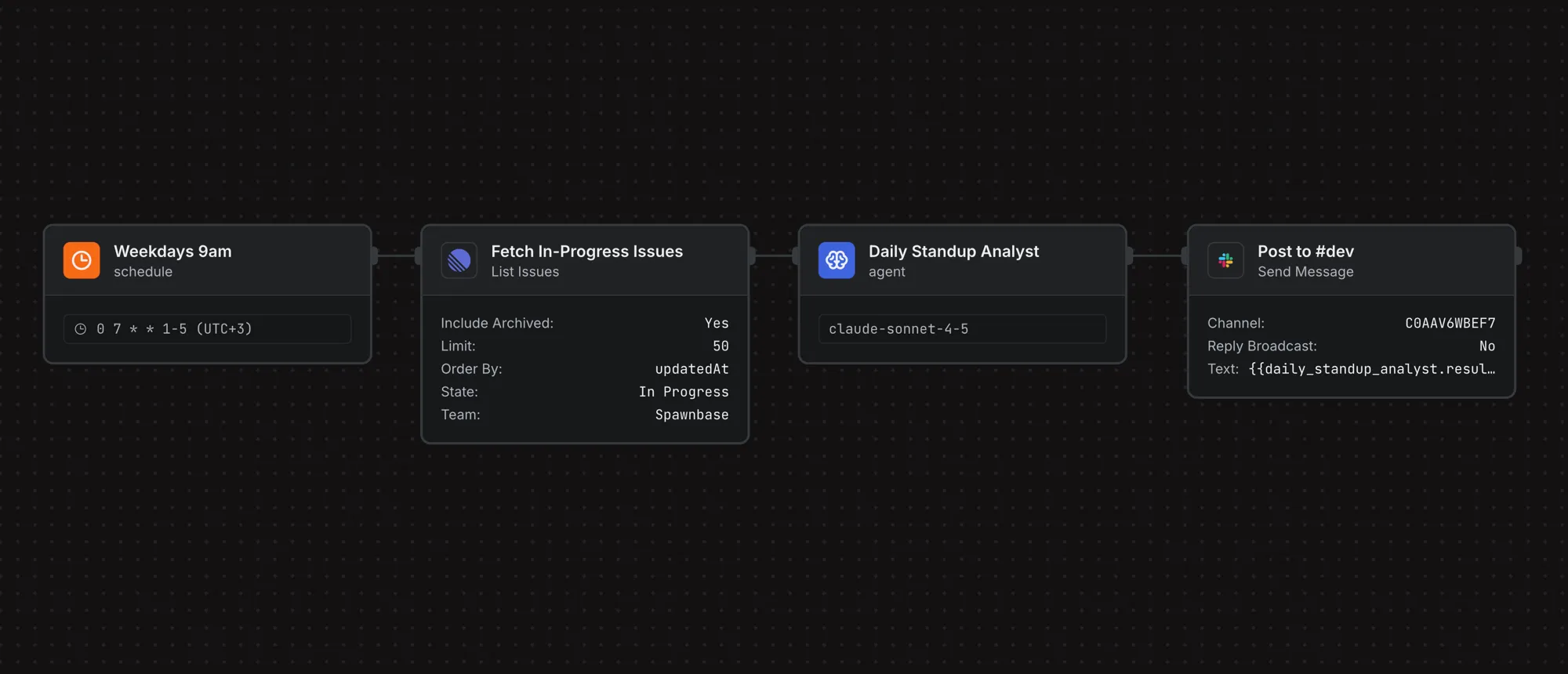
You review each node, test it, and deploy. The whole workflow takes about five minutes to get running.
Describe what you want in plain English. The copilot builds the workflow. Try it →
How the workflow works
There are four nodes. Each one has a narrow job:
Schedule. A cron trigger that fires every weekday at 9am. You set the timezone once and leave it alone.
Fetch in-progress issues. A Linear action that pulls all in-progress issues for your team in the current cycle. It filters by status, sorts by last updated time, and returns the raw task data. If you use Jira instead, the pattern is the same.
Daily standup analyst. This is the only step that needs reasoning. It takes the raw task list and does what a team lead or PM would otherwise do by hand: group work by assignee, find tickets that have been sitting too long, flag missing priorities or descriptions, and call out what deserves attention first.
Post to #dev. A Slack action that sends the result to the channel. Same destination every day. No extra logic.
That split matters. AI handles the judgment call. The rest of the workflow is deterministic.
Customize it to your process
This workflow is a starting point. Most teams will want to tweak it.
Change what gets reported. Maybe your biggest issue is not task status but PR review debt. Add GitHub and include open pull requests. Or filter the report down to one project, one label, or one team.
Change how it gets analyzed. The prompt controls what the analyst looks for. If you care about anything stuck longer than three days, add that rule. If you want a short "wins from yesterday" section, ask for it.
Change where it goes. Post to a different Slack channel for each team. Send a blockers-only version to an engineering lead. Or skip Slack and publish the report somewhere else.
Change the tone. Some teams want a straight, dry summary. Some want the report to be a little more blunt about what is slipping. That is just prompt work.
The nice part is that you do not need to rebuild the workflow every time. Usually you just adjust the prompt.
What it costs
A daily standup report with ~20 in-progress issues runs through about 15K input tokens (task data, metadata) and 3K output tokens (the formatted report).
| Option | Per run | Monthly (weekdays) | |
|---|---|---|---|
| Haiku / Flash | $0.02 | $0.44 | Fast, cheap, good enough |
| Sonnet 4.6 | $0.08 | $1.76 | Better analysis |
| Opus 4.6 | $0.38 | $8.36 | Overkill for standups |
| Standup bots | — | $4-8/user | Team of 5 = $20-40/month |
| The PM doing it | — | 15 min/day | 5+ hours/month |
The Linear and Slack API calls cost $0. They are just data in and message out. Sonnet is a reasonable default here: good enough to catch stale tasks and blockers, cheap enough to run every morning without thinking about it.
$1.76/month for daily standup reports. Less than a coffee. Try it free →
Stop reading status, start making decisions
When the status is already on the screen before the meeting starts, the meeting can focus on decisions, unblocking, and alignment.
That is really the tradeoff. Either you spend standup time reading the board out loud, or you let the workflow do that part and use the meeting for the conversation humans are actually needed for.
Build this agent in 5 minutes
Connect your Linear, tell the copilot what to report. Free credits on signup.
Start building →